
DevOps
Docker ADD vs COPY vs VOLUME – [2025]
Let’s Learn Docker ADD vs COPY vs VOLUME with Simple Examples :
We’ll learn in this tutorial the differences between Docker ADD vs COPY vs VOLUME when configuring Dockerfiles.
They all accomplish the same task (among other capabilities): moving files from the host computer to a Docker container.
VOLUME
VOLUME is different from COPY and ADD because it creates a mount point that the host operating system can interact with.
|
1 |
VOLUME /Users/sjobs/Documents/cool-project /var/www |
This command syncs the Docker container’s /var/www directory with the host OS’s cool-project directory. When any change is made to cool-project within the host OS it is immediately made available to the docker container mounting that directory and vice versa.

Using VOLUME is especially useful for development environments where frequent modifications to the code are being made. For example, running nodemon on a Docker container with a VOLUME allows you to make changes to your code that are immediately reflected as if Docker were invisible.
COPY
COPY accomplishes everything that VOLUME accomplishes, but does it during build time. This is necessary for configuring containers with modified config files with services such as httpd, Nginx, MongoDB, etc… For example when configuring an Nginx container modifying the nginx.conf file is an operation that must be done with COPY.
One setback to COPY is that it makes only the container that was copied to aware of the contents. Meaning we cannot access the contents on our host computer, or on other running docker containers, something VOLUME does.

ADD
ADD is exactly the same as COPY except for one distinct difference. ADD can fetch content from a URL and it will not extract the content, only downloading to the specific location. Check the bellow example.
|
1 |
ADD https://www-us.apache.org/dist//httpd/httpd-2.4.41.tar.gz /linuxteacher/from_url |
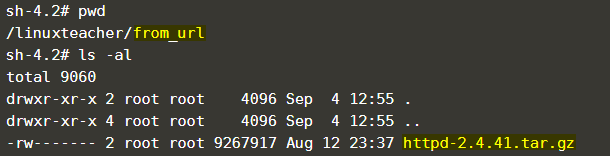
If the local content is recognized as compressed, will uncompress the contents. Check the bellow example.
|
1 |
ADD abc.tar.gz /linuxteacher/from_local |
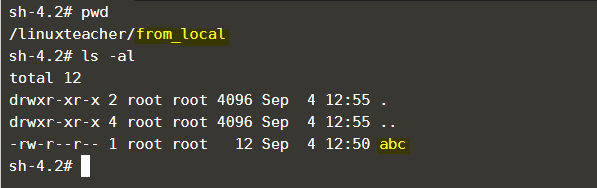
It has the same setbacks that COPY has.
This is the Dockerfile we used for the above Examples.

What do I do?
I use Volumes by default whenever I can so that I don’t have to rebuild my Docker container every time there’s a modification to the code.
So this is the ending of the Docker ADD vs COPY vs VOLUME Article. we will appreciate your feedback and check out our new article about mail Command in Linux.

-

 DevOps6 years ago
Saltstack Tutorial for beginners [2025]
-

 DevOps6 years ago
How to build a Docker cron job Container easily [2025]
-

 Linux7 years ago
mail Command in Linux/Unix with 10+ Examples [2025]
-
 DevOps6 years ago
How to setup Pritunl VPN on AWS to Access Servers
-

 Linux7 years ago
Grep Command In Unix/Linux with 25+ Examples [2025]
-

 Linux7 years ago
Find command in Unix/Linux with 30+ Examples [2025]
-
Linux6 years ago
How To setup Django with Postgres, Nginx, and Gunicorn on Ubuntu 20.04
-

 Linux7 years ago
Whereis command in Linux with 10+ Examples [2025]
1 Comment